WhoGoes vs Manual LinkedIn Search: Attendee Lists in Minutes vs Hours
Minutes vs 4+ hours
Quick answer: Manual LinkedIn searching takes 4+ hours per event, produces incomplete results (you're at the mercy of LinkedIn's algorithm), and doesn't include verified emails. WhoGoes automates this entire process: verified attendee lists with emails and LinkedIn proof in minutes, starting at $29 for 200 contacts.
If you've ever tried to build an event attendee list by searching LinkedIn manually, you know the drill. Hours of scrolling, copy-pasting into a spreadsheet, guessing who actually attended, and you still don't have verified emails when you're done. For background on what a trade show attendee list is and why this kind of data matters for B2B outreach, see the WhoGoes blog. The pattern shows up at every major event, from HIMSS on the healthcare side to anything else where buyers cluster in one place.
I've watched SDR teams spend entire afternoons on this for a single event. It works, technically. But it doesn't scale, and the results are always incomplete.
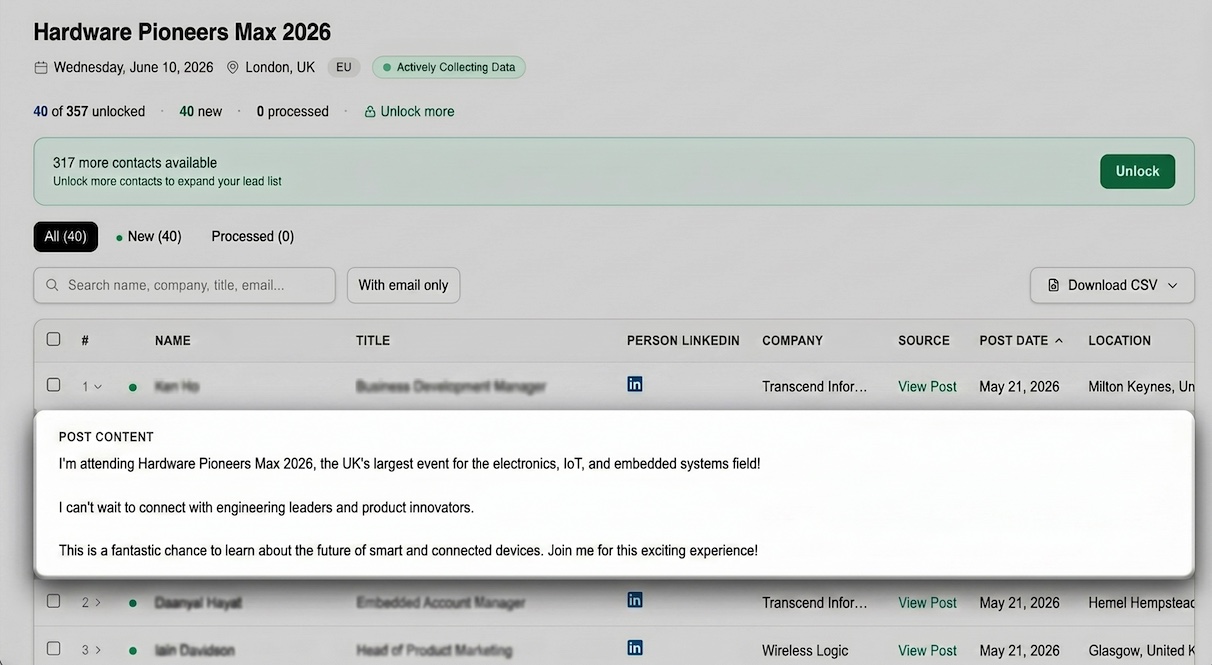
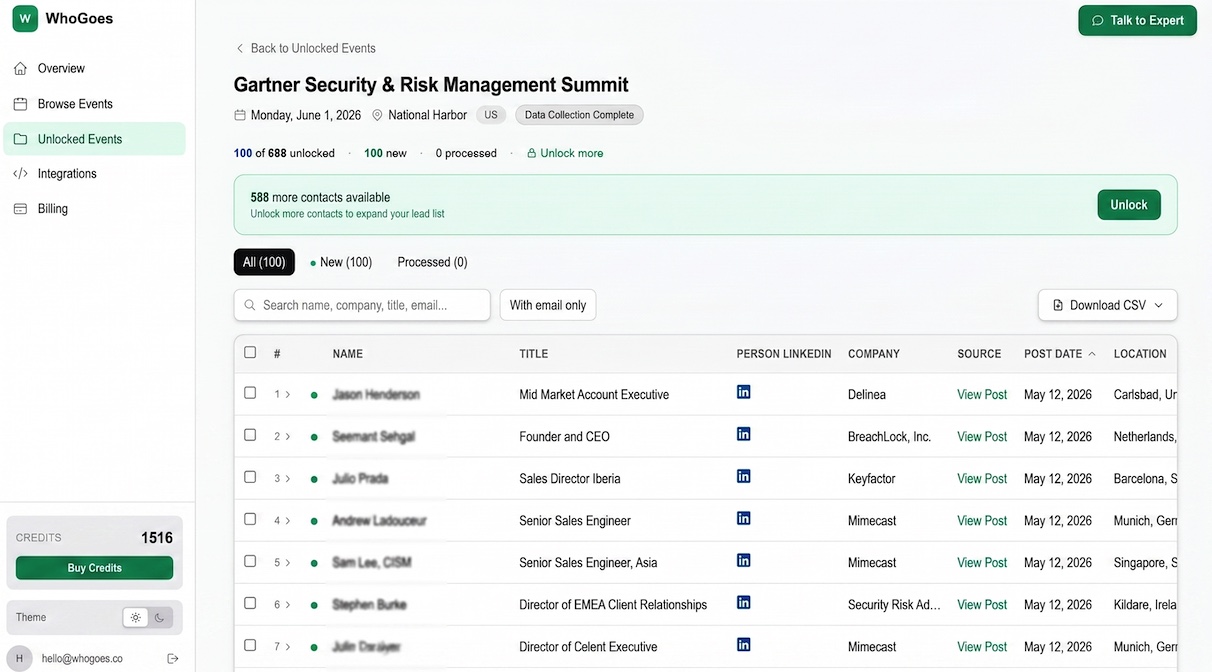
WhoGoes automates the whole process. It monitors public LinkedIn posts about trade shows and conferences, then compiles verified attendee lists with names, companies, job titles, emails, and LinkedIn proof of attendance.
Key Takeaways
- Manual LinkedIn searching takes 4+ hours per event; WhoGoes delivers the same data in under 5 minutes
- LinkedIn's algorithm only shows you a fraction of relevant posts, so manual searching always produces incomplete lists
- WhoGoes includes verified emails with every contact; manual searching doesn't give you emails at all
- At an average SDR salary, 4 hours of searching costs ~$110 in labor, more than a WhoGoes list
| Feature | WhoGoes | Manual LinkedIn Search |
|---|---|---|
| Time per event | Under 5 minutes | 4+ hours |
| Verified emails | Included with every contact | Not included |
| LinkedIn proof | Automatic, linked to source post | Manual screenshots |
| Coverage per event | Hundreds to thousands of contacts | Limited to what the algorithm shows |
| Cost | From $0.075/contact | Free (your time) |
| Events covered | 1,200+ trade shows | Any event |
| Data freshness | Updated as new posts appear | Point-in-time snapshot |
The Real Cost of Manual LinkedIn Searching
LinkedIn search is technically free. But free is misleading when you factor in the labor. Not actually free. Far from it. Once you account for the 4-plus hours an SDR spends manually searching for attendees, copy-pasting into a spreadsheet, and then running a separate enrichment step to get email addresses, the real cost per event list is well over $100 in salary alone, before you factor in incomplete results and the opportunity cost of that time.
At an average SDR salary of $55K/year, 4 hours of searching costs roughly $110 in wages alone. That's for a single event. If your team attends 10+ events per year, that's over $1,100 just in search time. And at the end of all that work, you still don't have verified emails. You've got names and LinkedIn profiles, but no way to actually email anyone without a separate enrichment step.
With WhoGoes, that same list costs $15 to $30 depending on your plan, and you get it in minutes with verified emails included. The ROI math isn't complicated.
What You Get With Manual LinkedIn Search
To be fair, manual searching has its place. It's not always the wrong choice. Limited cases. Specific ones. Manual LinkedIn searching makes sense primarily when you're targeting a very niche or small event where automated tools don't yet have coverage, or when you need just two or three specific contacts you can find directly, saving the $29 per-event cost for a list you could build yourself in ten minutes.
- Any event, any size. LinkedIn search works for very niche events WhoGoes may not cover yet
- Free. No budget required, just your time (or your SDR's time)
- Custom filtering. You control exactly which profiles to include
The tradeoff: if you value your time at more than $7/hour, WhoGoes pays for itself on the first event. And that's before you account for the completeness gap.
The Completeness Gap
This is the part that gets overlooked. Real problem. Invisible one. Most SDRs doing manual LinkedIn searches assume they're finding everyone, when in reality LinkedIn's algorithm decides what to surface and what to hide, meaning the list you build by hand is always a partial slice of the actual attendee population. When you search LinkedIn manually, you only see what LinkedIn's algorithm decides to show you. It's not a complete index of every post mentioning an event. I've tested this: run the same search query two hours apart and you'll get different results.
WhoGoes captures posts systematically across a much wider net. For a mid-size trade show, manual searching might surface 30 to 50 attendees. WhoGoes will often have hundreds for the same event.
What You Get With WhoGoes
- Verified attendee lists for 1,200+ trade shows and conferences, from HIMSS to niche industry events
- LinkedIn proof: every contact is linked to a public post proving they attended or plan to attend
- Verified emails included with every unlocked contact
- 5 free preview contacts per event, no credit card required
- Pay-as-you-go pricing starting at $29 for 200 contacts
Who Should Use Manual LinkedIn Search?
Manual searching makes sense if you're attending a very niche event with under 50 attendees, or if you need just 2 to 3 specific contacts and already know their names. For anything larger, the time investment doesn't add up. Very narrow fit. Shrinking use case. As WhoGoes grows its event catalog, the situations where manual searching outperforms an automated tool keep getting smaller, because even for niche regional events, the time cost of 4 hours of manual research almost always exceeds the $29 cost of an automated list.
Who Should Use WhoGoes?
WhoGoes is built for SDRs and BDRs at B2B companies who attend multiple trade shows per year. If you need attendee lists for pre-event outreach, post-event follow-up, or account-based targeting, WhoGoes saves hours per event and produces a more complete list. Most teams qualify. Standard use case. Any sales team covering two or more trade shows per year and relying on event outreach as a meaningful pipeline source should be using WhoGoes rather than spending 4 hours per event on a manual process that produces incomplete results and still doesn't include verified email addresses.
Ready to get your attendee list?
Browse 1,200+ trade shows. 5 free preview contacts per event.
Browse Events FreeBottom Line
Manual LinkedIn searching costs you hours and doesn't include verified emails. WhoGoes gives you the same data (plus emails and LinkedIn proof) in minutes, starting at $29. For any SDR doing pre-event outreach across multiple events, it's not a close comparison. Not even close. Easy decision. When you factor in that 4 hours of SDR time costs $110 in salary, produces an incomplete list, and still leaves you without verified email addresses, the $29 cost of a WhoGoes list stops looking like a purchase decision and starts looking like a no-brainer.
Related: Trade Show Attendee Data for SDRs, a practical workflow for using attendee lists in your outreach sequences.
More comparisons: WhoGoes vs Apollo for events and WhoGoes vs ZoomInfo for events.