WhoGoes vs eGrabber: Event Attendee Data Comparison
Ready-made attendee lists vs a desktop contact extraction tool
Quick answer: eGrabber and WhoGoes solve different problems. WhoGoes is a ready-to-use trade show attendee data provider. You pick an event, preview 5 contacts free, and pay $29 for 200 LinkedIn-verified attendees with proof of attendance. eGrabber sells LeadGrabber Pro, a $3,495/year Windows desktop app that extracts names from public pages and finds their emails. With eGrabber you still have to source the attendee list yourself. With WhoGoes the list is already built and verified.
Sales teams often ask if eGrabber is a cheaper way to get trade show attendee lists. It isn't. They're different tools for different jobs. Here's the honest comparison.
eGrabber is a contact sourcing software company founded in 1998. Their flagship product, LeadGrabber Pro, is a Windows desktop app that extracts names from public web pages (LinkedIn search results, speaker directories, Google results) and appends business emails, phones, and titles. They market several use cases, including "build conference attendee lists" from public speaker pages.
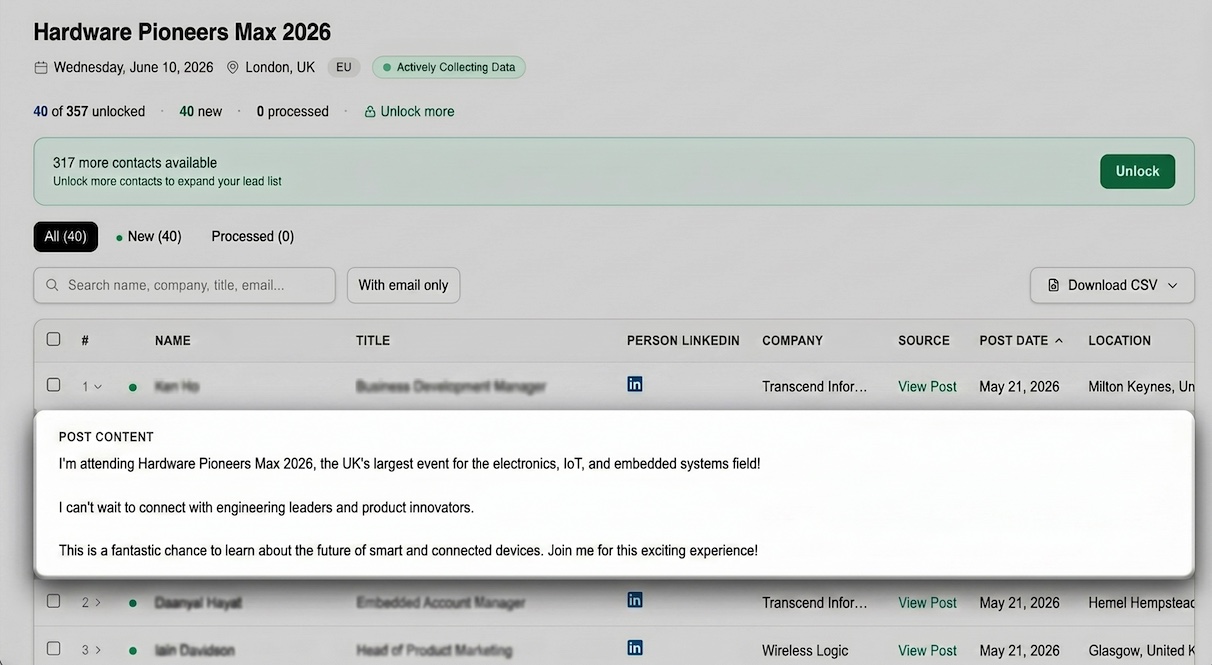
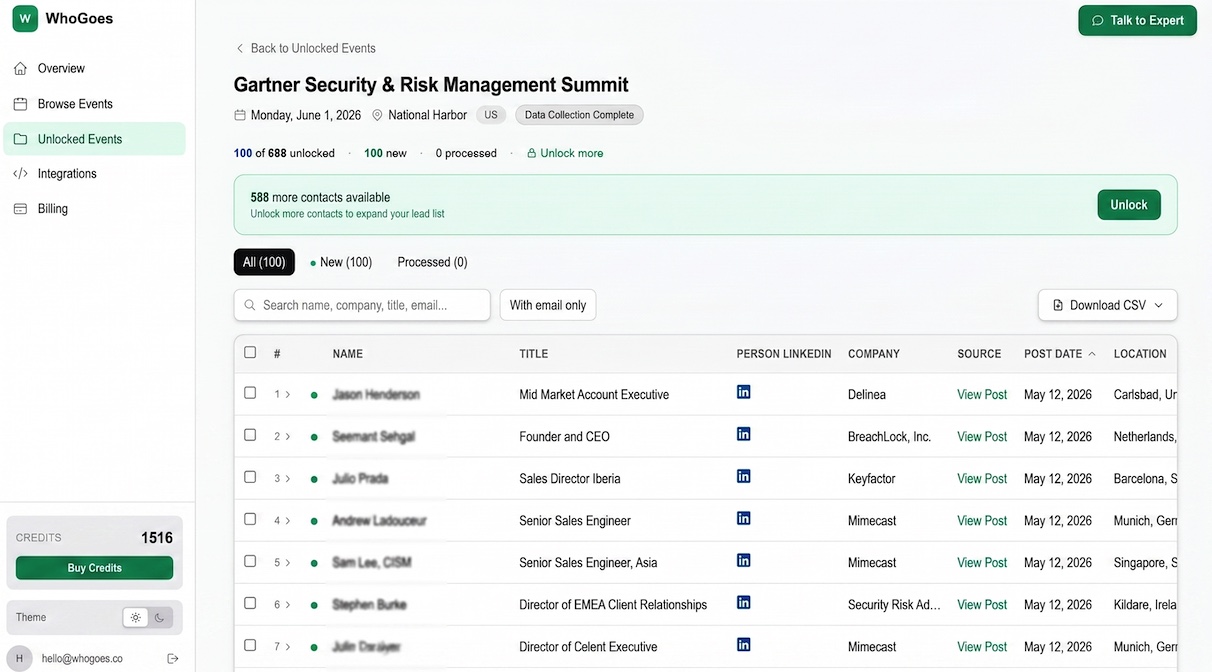
WhoGoes provides ready-made trade show and conference attendee lists sourced from public LinkedIn posts. Every contact comes with a link to their LinkedIn post about the event as proof of attendance. Pricing starts at $29 for 200 verified contacts per event. Free preview of 5 contacts before you pay.
What Matters Most
- eGrabber is a general contact extraction tool; WhoGoes is an event attendee data provider
- eGrabber requires you to source the list yourself first; WhoGoes delivers the list pre-built
- eGrabber runs $3,495/year minimum; WhoGoes is $29 per event with no commitment
- eGrabber has no proof of attendance; WhoGoes links to each person's LinkedIn post about the event
- eGrabber is Windows desktop only; WhoGoes runs in any browser
- eGrabber verifies emails; WhoGoes verifies attendance
| Feature | WhoGoes | eGrabber (LeadGrabber Pro) |
|---|---|---|
| Product category | Event attendee data provider | Contact extraction desktop app |
| Data source | Public LinkedIn posts about the event | User-supplied web pages + email pattern matching |
| Proof of attendance | LinkedIn post link per contact | None |
| List is pre-built | Yes | No, you build it |
| Preview before buying | 5 contacts free per event | Not available |
| Pricing model | $29 per 200 contacts (per event) | $3,495/year subscription |
| Minimum spend | $29 | $3,495/year |
| Platform | Browser, any OS | Windows desktop only |
| Delivery | Instant CSV + dashboard | You run the tool on your machine |
| Event coverage | 1,200+ tracked events | Any event with a public web presence |
| Email verification | Yes, before delivery | Yes, SMTP + pattern matching |
| CRM integration | CSV export | CSV export, direct CRM push (higher tiers) |
What eGrabber Does Well
eGrabber has been around since 1998 and LeadGrabber Pro is a legitimately useful tool for a specific job. If you already have a source list of names and need contact details, it works. Mature product. Well-documented. For B2B teams that do broad contact sourcing across many use cases — not just events — LeadGrabber Pro's combination of email appending, SMTP verification, and web page extraction can genuinely pay for itself over the course of a year, particularly for teams that already work in the kinds of source lists the tool was designed to process.
- Bulk email and phone appending. Feed it 1,000 names with company names, and LeadGrabber will find business emails and phone numbers for most of them. It uses pattern matching, SMTP verification, and public data to build contact records.
- Web page extraction. Point it at a LinkedIn search result, a speaker page, or a Google Maps business list, and it will pull names and companies into a spreadsheet. You then enrich those records.
- Deep feature set. The Pro and MX tiers include deduplication, list building from resume databases, and prospect research across multiple sources.
- Mature product. 25+ years of development means the tool is stable and well-documented for users who fit its workflow.
If your team does broad B2B contact sourcing across many use cases (not just events), LeadGrabber Pro can pay for itself. For teams focused specifically on getting trade show attendee lists, it's the wrong tool.
Where WhoGoes Wins
1. The list is already built
This is the biggest difference. With LeadGrabber, a typical "conference attendee" workflow looks like this:
- Find the event speaker page or agenda page
- Extract speaker names into LeadGrabber
- Let LeadGrabber append emails and phone numbers
- You now have contacts for 30-80 speakers, not attendees
Real attendee lists are almost never published on public pages. Speakers are. Exhibitors are. General attendees are not. So LeadGrabber can help you target speakers and exhibitors, but it cannot give you the full attendee base.
WhoGoes flips this. We source from LinkedIn posts where actual attendees publicly mention going to the event. That includes speakers, exhibitors, sponsors, and regular attendees. You get the full picture without doing the sourcing work yourself.
2. Pay-per-event beats annual subscription
LeadGrabber Pro starts at $3,495 per year. That's a serious commitment for a team that might only need attendee data for 4-8 events a year.
WhoGoes is $29 per 200 contacts, with no annual contract. If you need one event, you spend $29. If you need ten events, you spend around $290. If you never use it again, you spend nothing.
For teams running 2-3 major trade shows a year, WhoGoes is 10-100x cheaper than eGrabber.
3. Proof of attendance changes how you cold outreach
Every WhoGoes contact comes with a link to the LinkedIn post where that person mentioned attending the event. You can click the link, read their post, and reference it in your opening line: "Saw you're going to RSAC 2026, you mentioned interest in the zero-trust track..."
LeadGrabber gives you a clean email address. It doesn't prove the person is going to your event. Your subject line has to work harder because your reference is weaker.
For more on why attendance proof matters, see How to Tell If an Event Attendee List Is Fake or Genuine.
4. Works on any device, instantly
LeadGrabber is a Windows desktop application. Mac and Linux users need a virtual machine or Parallels. Teams that work across devices need shared licenses.
WhoGoes runs in the browser. Buy, filter, export. Your SDR on a MacBook and your ops lead on a Windows laptop both use the same dashboard without any setup.
5. Transparent preview before you pay
Every WhoGoes event page shows the first 5 attendee records for free before you pay. You see exactly what you're buying. Names, titles, companies, LinkedIn proof.
With eGrabber, you commit to a $3,495/year license before you can test whether the tool fits your workflow. That's a high-stakes trial.
When to Use Each
Clear split. Different jobs. The right choice depends entirely on whether you need general contact extraction across many source lists or a ready-made attendee dataset for specific trade shows, because those two workflows have almost nothing in common despite both producing lists of contacts with emails.
Use eGrabber if:
- Your team needs broad B2B contact sourcing across many use cases (not only events)
- You already have source lists of names and need emails and phones appended at scale
- You run Windows and prefer a desktop tool
- You have budget for an annual software subscription
- You're comfortable building your own attendee lists from speaker pages and LinkedIn searches
Use WhoGoes if:
- You want ready-made trade show attendee lists without sourcing them yourself
- You need contacts for 1-20 events a year and don't want an annual commitment
- You want to see proof each contact actually attended the event
- You run cross-platform teams and want a browser-based tool
- You want to preview data before buying
- You need pre-event signals to fill your booth calendar weeks before the show
Use both if:
- You have the LeadGrabber budget for general prospecting and want WhoGoes for event-specific data. WhoGoes handles the attendee list. LeadGrabber handles the rest of your sourcing workflow.
The Honest Summary
eGrabber LeadGrabber Pro is a real tool with a real audience. It's not built for event attendee data specifically. It's built for general B2B contact extraction and email appending. If that's what you need, it's a reasonable buy. Wrong tool. Right tool. The question is simply whether you need a general contact extraction platform or a ready-made trade show attendee dataset, and that question should take about thirty seconds to answer once you understand what each product actually does and who it was designed for.
If you specifically need trade show attendee lists, LeadGrabber makes you do the hardest part yourself: finding the source list. WhoGoes skips that step entirely. You get 200 LinkedIn-verified attendees for $29, with proof you can click and read in seconds.
For a complete breakdown of every way to get trade show attendee data (including DIY methods), see How to Get a Trade Show Attendee List in 2026.
Ready to get your attendee list?
Browse 1,200+ trade shows. 5 free preview contacts per event.
Browse Events Free